
0. 개요
요즘 레이트레이싱에 관련된 작업을 시작하게 되어 정리차원에서 블로깅하게 되었습니다. 현재는 TinyRaytracer를 마개조 중이었고, 이번 글은 깃헙의 TinyRaytracer를 기반으로 레이트레이싱 기법에 대해 간략하게 설명해보도록 하겠습니다. 최적화 기법은 추후에 다룰 예정입니다. 다른 포스팅에서 확인 부탁드립니다. (fresnel equation이 추가되었습니다.)
TinyRaytracer를 간략하게 설명드리면 다음과 같이 세 단계로 구성되어 있습니다.
- 카메라에서 레이를 캐스팅한다.
-> 레이를 추적하여 레이와 충돌된 물체의 diffuse, specular, reflect, refract 컬러를 계산하여 더한다.
-> ppm파일로 추출한다.
1. 요소
- 객체
Light : 그저 빛
Material : 재질
Object : 화면에 표시할 객체, 여기서는 간단하게 표현하기 위해 sphere만을 사용
- 기능
render
- ppm파일에 해당 씬을 그려주는 함수
cast_ray
- 이를 캐스팅하고 충돌한 Object와 Light를 참조하여 Material 값을 계산한 후, 컬러값을 반환
scene_intersect
- 레이를 씬과 충돌연산하여 hit point, hit normal, material 값을 반환
reflect
- 물체에 반사된 레이의 컬러값을 반환
refract
- 물체에 투과된 레이의 컬러값을 반환
fresnel
- 레이의 입사각 및 물체의 Normal, 투과율에 따라 변하는 reflect와 refract의 비율을 반환
(이 부분은 tiny raytracer에는 없고, 퀄리티 업을 위하여 추가한 기능)
1. 객체 설명
- Light
struct Light {
    Light(const Vec3f &p, const float i) : position(p), intensity(i) {}
    Vec3f position;
    float intensity;
};
Ambient light 입니다.
- Material
struct Material {
    Material(const float r, const Vec4f &a, const Vec3f &color, const float spec) : refractive_index(r), albedo(a), diffuse_color(color), specular_exponent(spec) {}
    Material() : refractive_index(1), albedo(1,0,0,0), diffuse_color(), specular_exponent() {}
    float refractive_index;
    Vec4f albedo;
    Vec3f diffuse_color;
    float specular_exponent;
};
refractive_index : 투과율(1.0 : 공기, 1.3~1.5 : 유리구슬, 1.8 : 다이아몬드)
albedo : diffuse(x), specular(y), reflection(z), refraction(w)에 대한 0~1 수치입니다.
- Object
struct Sphere {
	Vec3f center;
	float radius;
	Material material;

	Sphere(const Vec3f &c, const float r, const Material &m) : center(c), radius(r), material(m) {}

    bool ray_intersect(const Vec3f &orig, const Vec3f &dir, float &t0) const {
        Vec3f L = center - orig;
        float tca = L * dir;
        if (tca < 0) return false;
        float d2 = L*L - tca*tca;
        if (d2 > radius*radius) return false;
        float thc = sqrtf(radius*radius - d2);
        t0       = tca - thc;
		float t1 = tca + thc;
		if (t0 < 0) t0 = t1;
		if (t0 < 0) return false;
        return true;
    }
};
화면에 출력할 오브젝트입니다. 여기서는 편의상 구를 사용합니다.
ray_intersect함수의 경우, 레이의 original position, direction을 받아서 해당 오브젝트의 충돌검출(구와 직선의 충돌 알고리즘)과 함께 해당 오브젝트까지의 거리를 t0로 넘겨줍니다.
2. 기능 설명
- render
void render(const std::vector<const sdf_model*> &models, const std::vector<Light> &lights) {
    const int   width    = 1024;
    const int   height   = 768;
    const float fov      = M_PI/3.;
    std::vector<Vec3f> framebuffer(width*height);

    #pragma omp parallel for
    for (size_t j = 0; j<height; j++) { // actual rendering loop
        for (size_t i = 0; i<width; i++) {
            float dir_x =  (i + 0.5) -  width/2.;
            float dir_y = -(j + 0.5) + height/2.;    // this flips the image at the same time
            float dir_z = -height/(2.*tan(fov/2.));
            framebuffer[i+j*width] = cast_ray(Vec3f(0,0,0), Vec3f(dir_x, dir_y, dir_z).normalize(), models, lights);
        }
    }

    std::ofstream ofs; // save the framebuffer to file
    ofs.open("./out.ppm",std::ios::binary);
    ofs << "P6\n" << width << " " << height << "\n255\n";
    for (size_t i = 0; i < height*width; ++i) {
        Vec3f &c = framebuffer[i];
        float max = std::max(c[0], std::max(c[1], c[2]));
        if (max > 1) c = c * (1. / max);
        for (size_t j = 0; j<3; j++) {
            ofs << (char)(255 * std::max(0.f, std::min(1.f, framebuffer[i][j])));
        }
    }
    ofs.close();
}
카메라에서 레이를 발사하여 frame buffer에 기록하고, 그 데이터를 ppm 파일에 저장합니다.
- cast_ray
Vec3f cast_ray(const Vec3f &orig, const Vec3f &dir, const std::vector<Sphere> &spheres, const std::vector<Light> &lights, size_t depth=0) {
    Vec3f point, N;
    Material material;

    if (depth>4 || !scene_intersect(orig, dir, spheres, point, N, material)) {
        return Vec3f(0.2, 0.7, 0.8); // background color
    }

	Vec3f refract_color(0.f, 0.f, 0.f);
	// compute fresnel
	float kr;
	fresnel(dir, N, material.refractive_index, kr);
	// compute refraction if it is not a case of total internal reflection
	if (kr < 1) {
		Vec3f refract_dir = refract(dir, N, material.refractive_index).normalize();
		Vec3f refract_orig = refract_dir * N < 0 ? point - N * EPSILON : point + N * EPSILON;
		refract_color = cast_ray(refract_orig, refract_dir, models, lights, depth + 1);
	}

	Vec3f reflect_dir = reflect(dir, N).normalize();
	Vec3f reflect_orig = reflect_dir * N < 0 ? point - N * EPSILON : point + N * EPSILON; // offset the original point to avoid occlusion by the object itself
	Vec3f reflect_color = cast_ray(reflect_orig, reflect_dir, models, lights, depth + 1);

    float diffuse_light_intensity = 0, specular_light_intensity = 0;
    for (size_t i=0; i<lights.size(); i++) {
        Vec3f light_dir      = (lights[i].position - point).normalize();
        float light_distance = (lights[i].position - point).norm();

        Vec3f shadow_orig = light_dir*N < 0 ? point - N*EPSILON : point + N*EPSILON; // checking if the point lies in the shadow of the lights[i]
        Vec3f shadow_pt, shadow_N;
        Material tmpmaterial;
        if (scene_intersect(shadow_orig, light_dir, spheres, shadow_pt, shadow_N, tmpmaterial) && (shadow_pt-shadow_orig).norm() < light_distance)
            continue;

        diffuse_light_intensity  += lights[i].intensity * std::max(0.f, light_dir*N);
        specular_light_intensity += powf(std::max(0.f, -reflect(-light_dir, N)*dir), material.specular_exponent)*lights[i].intensity;
    }
    return material.diffuse_color * diffuse_light_intensity * material.albedo[0]
		+ Vec3f(1., 1., 1.)*specular_light_intensity * material.albedo[1]
		+ reflect_color * material.albedo[2] * kr
		+ refract_color * material.albedo[3] * (1 - kr);
}
레이를 발사하는 함수입니다. 먼저 장면에 충돌시켜 충돌된 위치(point)와 해당 point의 normal값을 구합니다. 그 후, 위 함수는 세 연산으로 나뉩니다.
첫번째는 레이 연산입니다. 레이 연산은 다시 세가지로 나뉘는데 fresnel equation, 반사(reflection), 투과(refraction입니다. 이 부분을 설명하기엔 길어지므로 아래의 각 파트에서 다루도록 하겠습니다.
두번째는 빛 연산입니다. 먼저 변수에 대한 설명을 진행하도록 하겠습니다.
diffuse_light_intensity는 분산광의 정도를 저장하는 변수입니다.
specular_light_intensity는 반사광의 정도를 저장하는 변수입니다.
light_dir는 빛이 diffuse light이므로 빛의 방향이 됩니다.
light_distance는 빛에서부터 point까지의 거리로 shadow casting을 할 때, 앞에 있는 물체를 검출하기 위해 사용할 값입니다. 앞에 물체가 있다면 light값을 적용하지 않습니다.
shadow_origin은 point의 위치를 EPSILON으로 보정한 값입니다. point의 앞에서 발사한 빛인지 뒤에서 발사한 빛인지를 내적으로 검출하여 EPSILON으로 보정하여 light_distance 비교연산을 할 때 오차를 줄여줍니다. light_distance 비교연산은 변수 설명이 끝난 후 설명하겠습니다.
shadow_pt는 빛에서 point로 레이를 발사하는 과정에서 부딪힌 point입니다. light_distance보다 짧은 곳에서 충돌했다면 point 앞에 물체가 있는 것으로 음영에 diffuse_light_intensity와 이 필요합니다.
tmpmaterial은 scene_intersect에 넣어주기 위한 용도로 TinyRaytracer에서는 사용하지 않습니다.
마지막으로 light_distance 비교연산을 진행하고 그 결과에 따라 light_intensity를 적용하게 됩니다. 빛에서부터 해당 point까지 scene_intersect를 진행하여 light_distance보다 짧은 거리에 위치한 물체가 있다면 light_intensity 연산을 하지않게 되는 것이지요.
세번째는 위 연산에 따라 색상을 혼합해주는 연산입니다. 여기서 주목해야할 부분은 reflect_color와 refract_color에 fresnel equation의 결과값인 kr을 적용해주는 부분입니다. 아래 fresnel편에서 자세히 다루도록 하겠습니다.
- scene_intersect
bool scene_intersect(const vec3 &orig, const vec3 &dir, const std::vector<Sphere> &spheres, vec3 &hit, vec3 &N, Material &material) {
    float spheres_dist = std::numeric_limits<float>::max();
    for (const Sphere &s : spheres) {
        float dist_i;
        if (s.ray_intersect(orig, dir, s, dist_i) && dist_i < spheres_dist) {
            spheres_dist = dist_i;
            hit = orig + dir*dist_i;
            N = (hit - s.center).normalize();
            material = s.material;
        }
    }

    float checkerboard_dist = std::numeric_limits<float>::max();
    if (std::abs(dir.y)>1e-3) { // avoid division by zero
        float d = -(orig.y+4)/dir.y; // the checkerboard plane has equation y = -4
        vec3 pt = orig + dir*d;
        if (d>1e-3 && fabs(pt.x)<10 && pt.z<-10 && pt.z>-30 && d<spheres_dist) {
            checkerboard_dist = d;
            hit = pt;
            N = vec3{0,1,0};
            material.diffuse_color = (int(.5*hit.x+1000) + int(.5*hit.z)) & 1 ? vec3{.3, .3, .3} : vec3{.3, .2, .1};
        }
    }
    return std::min(spheres_dist, checkerboard_dist)<1000;
}
레이를 원점으로부터 특정 방향으로 진행시킬 때의 hit point와 해당 point의 normal값을 검출하는 함수입니다.
Spheres와 checkboard를 검출하게 되어있습니다.
- reflect
Vec3f reflect(const Vec3f &I, const Vec3f &N) {
    return I - N*2.f*(I*N);
}
반사는 위의 코드처럼 심플합니다. 오른쪽 상단의 그림처럼 입사각과 반사각이 같다는 점을 이용하여 해당 공식을 유도하게 됩니다. 입사각과 반사각이 같게되면 오른쪽 하단의 그림처럼 표현할 수 있게 되는데요. 여기서 I와 R은 아래와 같이 구할 수 있습니다.
\(\hat{I} = \hat{A} + \hat{B}\)
\(\hat{R} = \hat{A} - \hat{B}\)
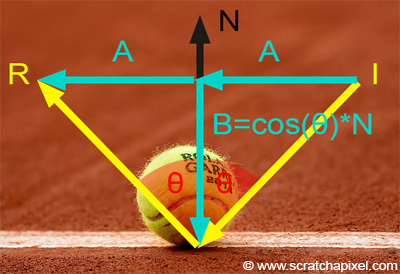
여기서 B는 N을 이용해서 아래와 같이 표현할 수 있습니다.
\(\hat{B} = cos({\theta}) * \hat{N}\)
그러면 이렇게 전개가 가능합니다.
\(\hat{I} = \hat{A} + cos({\theta}) * \hat{N}\)
\(\hat{A} = \hat{I} - cos({\theta}) * \hat{N})
\(\hat{R} = \hat{I} - 2cos({\theta}) * \hat{N}\)
I와 N은 방향을 나타내는 값으로 Normalize가 되어있어 스칼라값이 0입니다. 그리하여 아래의 수식으로 치환이 가능해집니다.
\(\hat{R} = \hat{I} - 2(\hat{I}\cdot\hat{N}) \hat{N}\)
- refract
Vec3f refract(const Vec3f &I, const Vec3f &N, const float eta_t, const float eta_i=1.f) { // Snell's law
    float cosi = - std::max(-1.f, std::min(1.f, I*N));
    if (cosi<0) return refract(I, -N, eta_i, eta_t); // if the ray comes from the inside the object, swap the air and the media
    float eta = eta_i / eta_t;
    float k = 1 - eta*eta*(1 - cosi*cosi);
    return k<0 ? Vec3f(1,0,0) : I*eta + N*(eta*cosi - sqrtf(k)); // k<0 = total reflection, no ray to refract. I refract it anyways, this has no physical meaning
}
refract는 snell's law에 의해 구현되었습니다.
우선 \(cos i\)를 확인하여 광선이 매질 안에서 발사되는 것인지를 확인합니다. 만약 \(cos i\)가 0보다 작으면 매질 안에서 발사되는 것이므로 eta_i와 eta_t를 교환해 다시 refract를 진행해줍니다.
매개변수 중 eta_t는 투과를 진행할 물체의 투과율로 영어로는 ior(index of refraction)라고도 부릅니다. eta_i는 광선이 있는 곳의 투과율입니다.
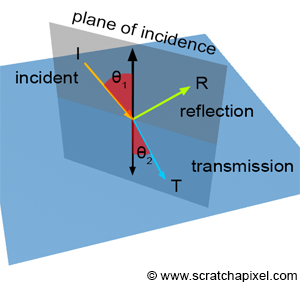
snell's law는 refraction을 설명하는 수식으로 다음과 같습니다.
- fresnel
void Fresnel(const Vector3f &I, const Vector3f &N, const float &ior, float &kr)
{
	float cosi = std::clamp(I.dot(N), -1.f, 1.f);
	float etai = 1, etat = ior;
	if (cosi > 0) { std::swap(etai, etat); }
	// Compute sini using Snell's law
	float sint = etai / etat * sqrtf(std::max(0.f, 1 - cosi * cosi));
	// Total internal reflection
	if (sint >= 1) {
		kr = 1;
	}
	else {
		float cost = sqrtf(std::max(0.f, 1 - sint * sint));
		cosi = fabsf(cosi);
		float Rs = ((etat * cosi) - (etai * cost)) / ((etat * cosi) + (etai * cost));
		float Rp = ((etai * cosi) - (etat * cost)) / ((etai * cosi) + (etat * cost));
		kr = (Rs * Rs + Rp * Rp) / 2;
	}
}
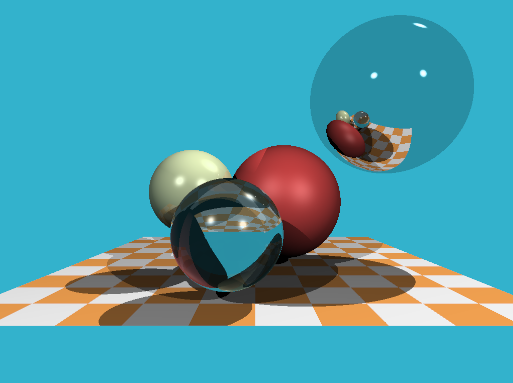
Result
References
Introduction to Shading (Reflection, Refraction and Fresnel)
Introduction to ShadingReflection, Refraction (Transmission) and Fresnel Reflection and refraction are very common in the real world and can be observed every day. Glass or water are two very common materials which exhibit both properties. Light can pass t
www.scratchapixel.com
github.com/ssloy/tinyraytracer
ssloy/tinyraytracer
A brief computer graphics / rendering course. Contribute to ssloy/tinyraytracer development by creating an account on GitHub.
github.com
'Game Programming > Graphics' 카테고리의 다른 글
| GPU의 역사 - 4 : DX11(SM5), Tessellation과 Compute Shader (0) | 2026.01.28 |
|---|---|
| GPU의 역사 - 3 : DX10/SM4와 Unified Shader 전환 (0) | 2026.01.09 |
| GPU의 역사 - 2 : SIMD에서 SIMT로, Branch Divergence (0) | 2025.12.05 |
| GPU의 역사 - 1 : FFP에서 SIMD까지 (0) | 2025.11.28 |
| Direct3D9 랜더링파이프라인 (0) | 2010.02.26 |